











Remote-access Trojans such as StrRAT and Ratty are distributed as a combination of polyglot files and malicious Java archive (JAR) files, and attackers are continually finding new ways to fly under the radar. It highlights once again that
Deep Instinct security researcher Simon Kenin said in the report:
A Polyglot file is a file that combines the syntax of two or more different formats so that each format can be parsed without error.
One such 2022 campaign spotted by a cybersecurity firm is deploying StrRAT payloads using JAR and MSI formats (i.e. files that are valid as both JAR and MSI installers). This also means that the file can be run by both Windows and the Java Runtime Environment (JRE), depending on how the file is interpreted.
Another example uses CAB and JAR polyglots to deliver both Ratty and StrRAT. Artifacts are propagated using URL shortening services such as cutt.ly and rebrand.ly, some of which are hosted on Discord.
“What’s special about ZIP files is that they’re identified by the presence of the tail of the central directory record at the end of the archive,” Kenin explains. “This means that any ‘junk’ you add to the beginning of the file will be ignored and the archive will still be valid. “
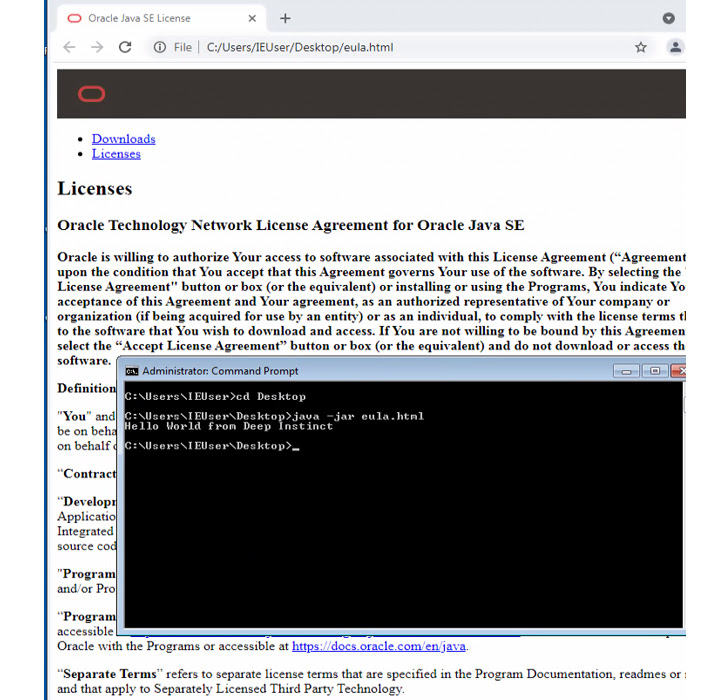
JAR files are not properly validated, creating a scenario where additional malicious content bypasses security software and remains undetected until executed on a compromised host.
This is not the first time such malware-laced polyglots have been detected in the wild. In November 2022, his Berlin-based DCSO CyTec discovered an information stealer called StrelaStealer that spreads as a DLL/HTML polyglot.
“Proper detection of JAR files should be both static and dynamic,” Kenin said. “It’s not efficient to scan every file for the presence of an end of central directory record at the end of the file.”
“A defender should monitor both the ‘java’ and ‘javaw’ processes. If such a process has “-jar” as an argument, the filename passed as an argument should be treated as a JAR file, regardless of file extension or Linux output. “File” command. ”
