












Unknown malware poses a serious cybersecurity threat and can cause serious harm to organizations and individuals. If left undetected, malicious code could access sensitive information, corrupt data, or give the attacker control over your system. Find ways to avoid these situations and efficiently detect unknown malicious behavior.
New threat detection challenges
Known malware families are more predictable and easier to detect, but unknown threats can take many forms, creating many challenges to detection.
-
Malware developers can use polymorphism to modify malicious code to generate their own variants of the same malware.
-
There is malware that has not yet been identified and does not have a ruleset to detect it.
-
Some threats can go completely undetectable (FUD) for some time and cause problems for your perimeter security.
-
Code is often encrypted, making it difficult to detect with signature-based security solutions.
-
Malware authors sometimes use a “low and slow” approach that sends small amounts of malicious code over the network over an extended period of time, making it difficult to detect and block. This can be particularly damaging in corporate networks where lack of visibility into the environment can lead to undetected malicious activity.
new threat detection
When analyzing known malware families, researchers can use existing information about the malware, including its behavior, payloads, and known vulnerabilities, to detect and respond to the malware.
But to deal with new threats, researchers need to start from scratch with the following guide.
step 1. Analyze malware code using reverse engineering to determine its purpose and malicious nature.
step 2Examine malware code using static analysis to identify its behavior, payload, and vulnerabilities.
Step 3. Observe the behavior of running malware using dynamic analysis.
Step 4. Run malware in an isolated environment using a sandbox and observe its behavior without harming your system.
Step 5. It uses heuristics to identify potentially malicious code based on observable patterns and behavior.
Step 6. Analyze the results of reverse engineering, static analysis, dynamic analysis, sandboxing, and heuristics to determine if your code is malicious.
From Process Monitor and Wireshark to ANY.RUN, there are many tools to help you through the first five steps. But how to draw an accurate conclusion? What should I pay attention to when getting all this data?
The answer is simple. Look out for signs of malicious behavior.
Monitor and effectively detect suspicious activity
Various signatures are used to detect threats. In computer security terms, a signature is a typical footprint or pattern associated with a malicious attack on a computer network or system.
Some of these signatures are behavioral. It is impossible to do anything in the OS without leaving traces. Suspicious activity can be used to identify what software or script it was.
You can run suspicious programs in a sandbox to observe malware behavior and identify malicious behavior such as:
- Abnormal file system activity
- Creating and terminating suspicious processes
- Abnormal network activity
- Read or modify system files
- Access to system resources
- create a new user
- Connect to remote server
- execute other malicious commands
- Exploit known system vulnerabilities
Microsoft Office is launching PowerShell – does that sound suspicious? The application is added to your scheduled tasks – be careful! The svchost process runs from the temporary registry. something is clearly wrong.
Even without signatures, threats can always be detected by their behavior.
Let’s prove it.
Use case #1
Here is a sample of the stealer. what is it for? Steal user data, cookies, wallets, etc. How can I detect it? For example, if an application opens a Chrome browser login data file, it reveals itself.
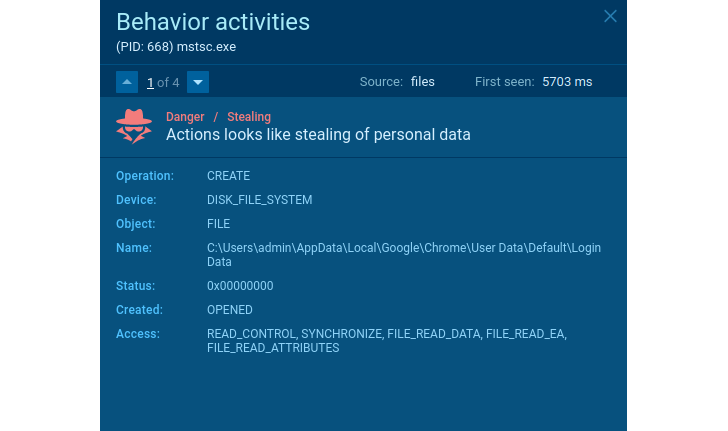 |
| Stealer’s Suspicious Behavior |
Network traffic activity also indicates the malicious intent of the threat. Legitimate applications never send credentials, OS characteristics, and other locally collected sensitive data.
For traffic, known features can detect malware. Agent Tesla may not encrypt data sent from an infected system, as in this sample.
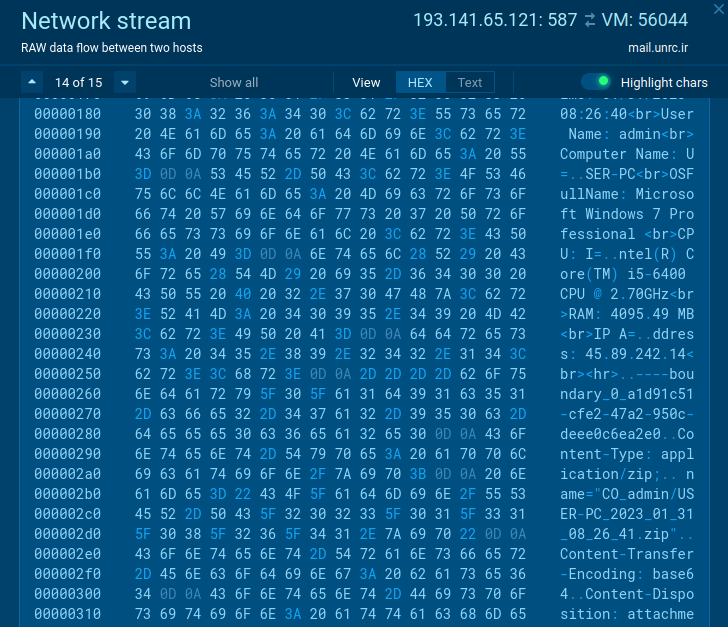 |
| Suspicious activity in network traffic |
Use case #2
There are not many legitimate programs that should stop Windows Defender or other applications to protect the OS or exclude themselves. Whenever you encounter this type of behavior, it’s a sign of suspicious activity.
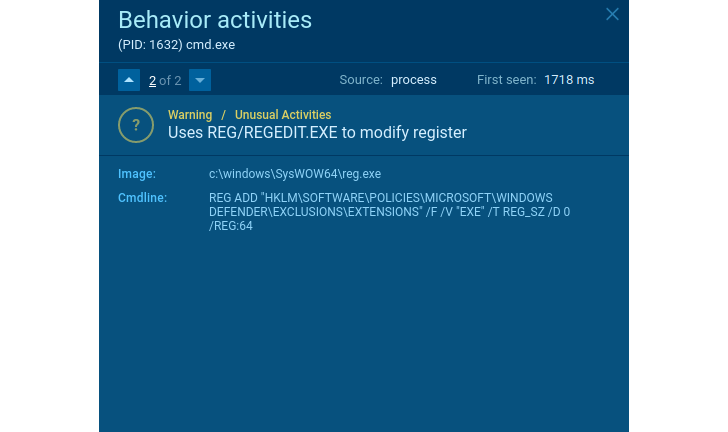 |
| suspicious behavior |
Does the application delete shadow copies? It looks like ransomware. Delete the shadow copy and create a TXT/HTML file with the readme text in each directory? That’s another proof.
If user data is encrypted in the process, you can be sure it is ransomware. Like what happened in this malicious example. Without knowing the family, you can identify what security threats this software poses, act accordingly, and take measures to protect your work stations and your organization’s network.
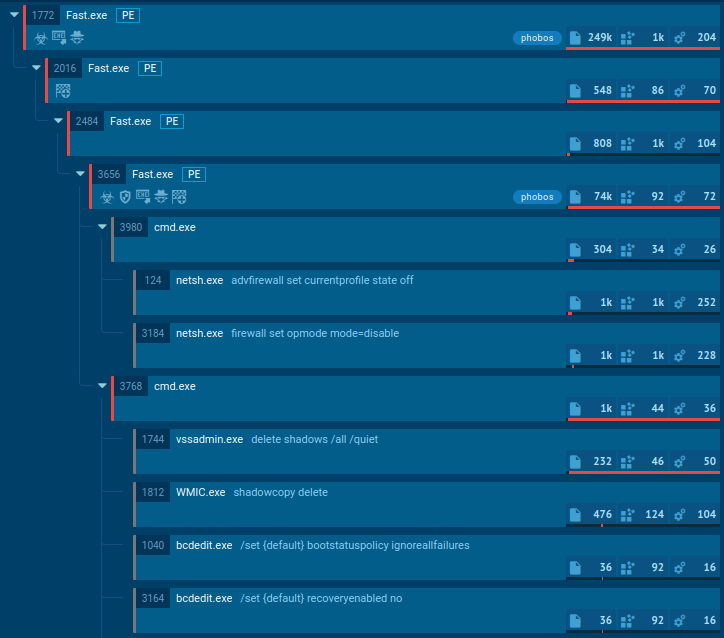 |
| Ransomware Suspicious Behavior |
Based on the behavior observed in the sandbox, conclusions can be drawn about almost any type of malware. Try and monitor the ANY.RUN online interactive service. Get instant results and see all malware actions in real time. Just what you need to detect suspicious activity.
write “Hacker News 2” Send your promo code at support@any.run using your company email address, GET ANY.RUN PREMIUM SUBSCRIPTION FOR FREE FOR 14 DAYS!
summary
Cybercriminals can use unknown threats to coerce companies into launching large-scale cyberattacks. Even if the malware family is not detected, we can always conclude the threat’s capabilities by considering the threat’s behavior. You can use this data to build information security to prevent new threats. Behavioral analytics enhances your ability to respond to new and unknown threats and increases your organization’s protection at no additional cost.
