












Secure Boot is an industry standard to prevent Windows devices from loading malicious firmware or software during the boot process. It should be on most of the time, and it’s the default setting mandated by Microsoft, so if it’s on, it’s fine. However, if you are using one of the over 300 motherboard models manufactured by manufacturer MSI in the last 18 months, you may not be protected.
Introduced in 2011, Secure Boot establishes a chain of trust between the hardware booting a device and the software or firmware. Before Secure Boot, devices used software called BIOS installed on a small chip to boot and recognize the hard drive, CPU, memory, and other hardware and instruct how to boot. I was. Once complete, this mechanism loads the bootloader and activates the tasks and processes to load Windows.
The problem was the BIOS loading the bootloader in the correct directory. That leniency allowed hackers with brief access to the device to install malicious firmware or rogue bootloaders running Windows images.
When secure boot collapses
About ten years ago, BIOS was replaced by UEFI (Unified Extensible Firmware Interface). This is a proprietary OS that can prevent loading system drivers and bootloaders that have not been digitally signed by a trusted manufacturer.
UEFI relies on a database of both trusted and revoked signatures that the OEM loads into the motherboard’s non-volatile memory during manufacturing. A signature lists the signer and cryptographic hash of every approved bootloader or his UEFI control application and is a means of establishing a chain of trust. This chain allows devices to be safely booted using only known and trusted code. Secure Boot shuts down the boot process if unknown code is scheduled to load.
Researchers and students recently discovered that more than 300 motherboard models from Taiwan-based MSI do not implement Secure Boot by default, allowing arbitrary bootloaders to run. Models work with a wide variety of hardware and firmware, including many from Intel and AMD (full list here). This drawback was introduced sometime in the third quarter of 2021. Researchers accidentally discovered the problem when trying to digitally sign various components of the system.
“On December 11, 2022, I decided to set up Secure Boot with sbctl on my new desktop,” writes Dawid Potocki, a Polish-born researcher now living in New Zealand. “Unfortunately, my firmware…accepted any OS image I provided, trusted or not. This wasn’t the first time Secure Boot was self-signed. I didn’t even do it.”
Potocki said he sees no indication that motherboards from manufacturers ASRock, Asus, Biostar, EVGA, Gigabyte, and NZXT suffer from the same drawbacks.
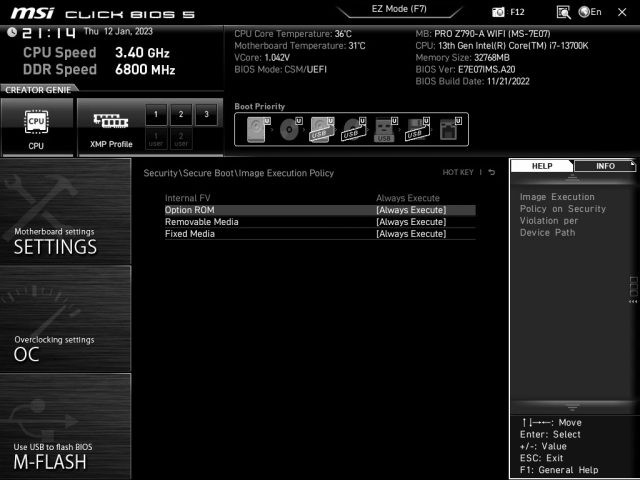
Researchers also reported that the broken Secure Boot was the result of MSI mysteriously changing default settings. Users wishing to implement Secure Boot will need to access the affected motherboard’s settings. To do this, hold down the Del button on your keyboard while the device boots.From there, select the menu that says Security\Secure Boot or select something to that effect, then Image Execution Policy sub menu. If the motherboard is affected, removable and fixed media are set to “always run”.
Getty Images
To fix, change “always run” to “deny run” for these two categories.
In a Reddit post published Thursday, MSI representatives confirmed Potocki’s findings. A representative wrote:
Pre-configure Secure Boot and set “Always Run” as the default setting to give multiple end-users the flexibility to build PC systems with thousands (or more) of components, including built-in options It provides a user-friendly environment where you can A ROM containing an OS image enables highly compatible configurations. Security-conscious users can manually set the “Image Execution Policy” as “Deny Execution” or other options to meet their security needs.
The post states that MSI will release a new firmware version that changes the default setting to “deny execute”. The subreddit linked above contains a discussion to help users troubleshoot the issue.
As mentioned earlier, Secure Boot is designed to prevent attacks where an untrusted person can covertly access a device for a short period of time to modify the firmware and software. Such hacks are usually known as “evil maid attacks”, but a better description is “ex-boyfriend stalking attacks”.
