











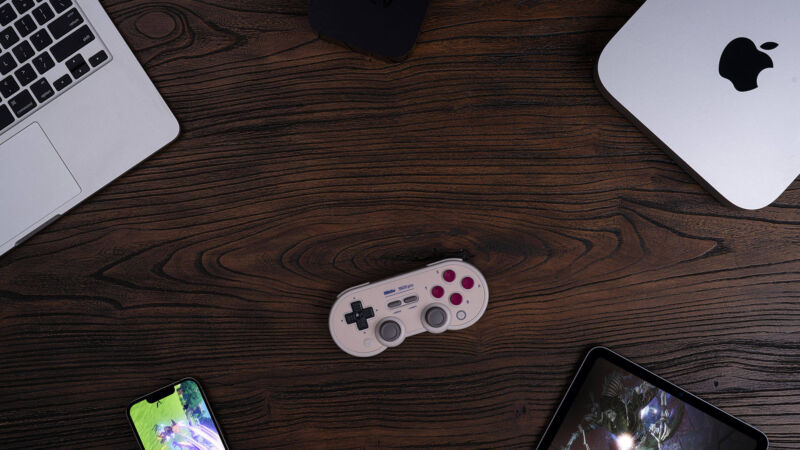
The 8BitDo SN30 Pro has been repeatedly called one of the best controllers for playing retro console games made especially for the Super Nintendo (SNES).
8BitDo’s new firmware update greatly improves the operation of the controller on Apple platforms such as Mac, iPhone, iPad and Apple TV. This is good news for those who want to play classic 16-bit games on their Mac, but the lack of retro console emulators on iPhone, iPad, or Apple TV makes it a bit of a waste on those platforms.
Admittedly, the firmware update doesn’t just apply to the SN30 Pro. 8BitDo’s Ultimate Controller 2.4g, Pro 2, and Lite SE also got firmware updates, as did the SN30 Pro variants SN30 Pro Plus and SN30 Pro for Android. The Ultimate Controller, Pro 2, and Lite SE are meant to be great all-rounders rather than retro controllers, so they’ll be a welcome addition to those who enjoy gaming on Apple Arcade and elsewhere.
However, 8BitDo is arguably most famous for its retro gaming cred. For example, its SNES and Sega Genesis-like controllers are Analogue’s meticulously crafted FPGA-based Super Nt, designed to play the original his SNES and Genesis cartridges. and paired with the Mega Sg console. The SN30 Pro is also a popular controller for playing his classic SNES games on Nintendo’s Switch Online service. The company has recently been looking at a fork from its retro controllers.
It was possible to use the SN30 Pro on a Mac in the past, but it was unsupported and could cause issues with games, certain buttons, etc.
To update your controller’s firmware, you can download 8BitDo’s upgrade tool, available for macOS and Windows. Your Mac should also be updated to at least macOS 13.2. The same is true for iPhones, iPads, and Apple TVs, which must run iOS 16.3, iPadOS 16.3, and tvOS 16.3 respectively.
The Complex Story of Gaming on Mac
A lot has been written over the years about how the Mac is clearly not the ideal platform for gaming. The main reason is that most of the “hardcore gamer” type games the Mac gets are mostly mediocre ports from Windows.
These ports became even more of an issue when Apple moved away from the x86 architecture and Intel chips to its own ARM-based silicon. On the other hand, modern Macs are much faster than older Intel ones (especially when it comes to graphics). So when game developers bring native versions of their graphics-intensive games to modern Macs, the performance is very impressive.
Apple has tried to flip the script by working with developers to offer games like Resident Evil Village and No Man’s Sky It also moved to the platform by requiring Mac support from those who make Apple Arcade games for iPhone and iPad. No Man’s Sky No hits yet Resident Evil Village I’m impressed with the Apple Silicon Macs. Unfortunately, these two games don’t even come close to what you can play on your Windows PC. Also, his Mac support for Apple Arcade games is often nominal at best, clunky, and the interface clearly not adapted well from mobile.
Samuel Axon
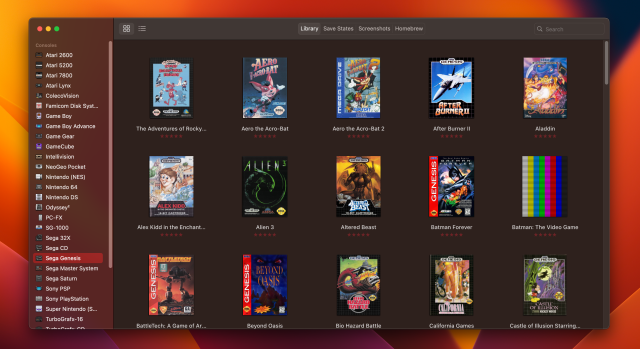
That said, the Mac has always been a powerful platform for playing emulated retro games. DOSBox is alive and well on Mac. I’m a big fan of OpenEmu. OpenEmu is his Mac-only multi-platform emulator for retro games with a nice interface. If you’re not too attached to a nice interface, and you’re okay with the bloat of uncontrolled features and the Linux vibe (I’m sure many of you are), you can also run the popular emulator RetroArch on your Mac. OpenEmu is still an x86 app, but for the most part works fine with Rosetta. RetroArch offers an Apple Silicon version.
Most emulated retro games run well on both Intel and Apple Silicon Macs, and Apple’s and 8BitDo’s efforts to support the SN30 make the possibilities even more compelling.
The iPhone isn’t great for retro gaming
8BitDo and Apple have made a lot of noise about these controllers coming to the iPhone, iPad, and Apple TV, but the retro angle isn’t as strong. Some game companies such as Sega and Square Enix offer many of their retro games as iPhone apps for a fee (or with ads), but in some cases they don’t even support controllers, only touch controls. Is not … Also, Apple does not allow the use of retro console emulators on the App Store. Macs can download applications from sources other than Apple’s App Store, but the company’s other platforms do not.
Without an emulator that gives users access to thousands of games lost to history, the iPhone wouldn’t be as compelling a retro gaming platform as a Mac, Windows PC, or Android phone.
That said, it’s still nice to see more controller options on the iPhone for other purposes. Firmware updates for the above controllers are available now. 8BitDo plans to extend this support to other previously shipped controllers, but there is no published timeline.
