











You may have come across this term while shopping for a new smart TV or TV box. Google TV and Android TV.
Want to know the difference between Google TV and Android TV? Read on.
Important points:
Google TV is a new and improved Android TV interface. Originally available only for Google Chromecast with Google TV, released September 30, 2020. Several new features focused on recommendations and content discovery have been introduced.
In other words, Google TV is based on the Android TV OS, but with a new and better interface.
4 advantages of Google TV over Android TV
1. Unification of home screens
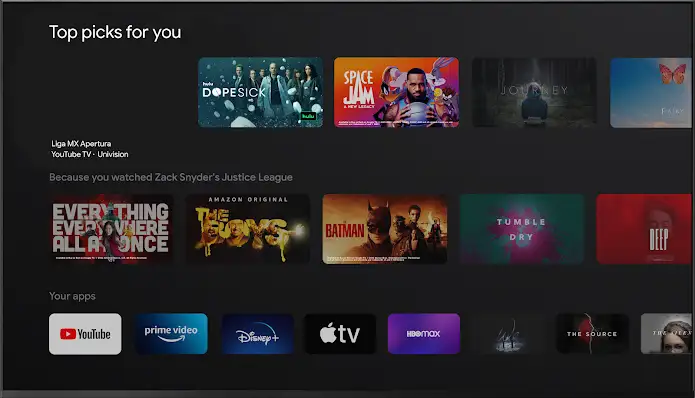
Here are the main differences between Google TV and Android TV: unified home screen.
The Google TV home screen has been updated to focus on new TV shows and movie recommendations.
it will be Suggest different movies and TV shows tv app who subscribed. This differs from his Android TV, where show recommendations are separate app-based.
2. Personalized recommendations
Users can now create multiple user profiles and create child profiles. Each profile shows different recommendations based on your viewing habits, saved shows, and watchlists.
A Google Kids profile allows you to set daily viewing limits, bedtime and content limits, as well as monitor app activity via Family Link.
3. More stable voice search
Google TV has more powerful voice search than Android TV OS. Voice Search for Google TV searches for keywords across all apps, including Live TV and YouTube.
This feature allows users to find desired content more easily and quickly.
4. Access your watchlist on your smartphone

Users can easily sync Google TV with their smartphones. On your smartphone, you can use Google Search to find movies and shows and add them directly to your Watchlist. Google TV automatically updates your watchlist.
After that, you can freely watch the show on Google TV.
Video review comparing Google TV and Android TV
Conclusion
In short, Google TV and Android TV OS are the same, but the interface has changed slightly. If you like an integrated home screen with various content recommendations from all your streaming apps, enjoy Google TV.
The cheapest and easiest way to start using Google TV in Malaysia is to buy Google Chromecast with Google TV.
Also, read our guide on the differences between Smart TVs and Android TVs.
Google TV FAQ
What’s the difference between Android TV and Google TV?
Google TV is powered by Android TV OS, but with a modern new interface. Almost all TV boxes and TV sticks on the market only use Android TV OS, lacking interface and features.Is Android app compatible with Google TV?
Can I install apps on Google TV?
Yes, you can access the same Google Play Store on Android TV OS. It has over 10,000 apps and is compatible with the most popular apps.
Is Google TV better than Android TV OS?
Not necessarily, but some people prefer Google TV because of its unified home screen. We recommend shows from a variety of streaming service providers. Also, some users prefer Android TV OS because it allows more customization.
