











The 2023 version of Apple’s Mac Mini looks basically the same as the Mac Minis of the last decade. But it’s also arguably the most exciting new product Apple has released this year (it’s still January).
like myself.
The reason is that Apple has included the latest Apple silicon in the 2023 Mac Mini. This can be configured with either of Apple’s M2 or M2 Pro chipsets. 2020.But in a rare twist, Apple actually Lowered price. The latest M2 Mac Mini starts at just $599 and is perfect for entry-level Mac setups.
The M2 chipset is a powerful upgrade (especially for Intel-based Macs).

I’ve been using the latest Mac Mini as my main work computer for the past week. My regular work computer is a 2016 MacBook Pro with an Intel chip, and the new Mac Mini blows me out of the water in terms of boot speed, load times, and overall quickness. Again, I’m not a super pro user. I work mostly in Safari and Chrome, and occasionally use Photoshop and Lightroom when I want to fine-tune my photos. But the new Mac Mini handles everything with ease. Heck, I didn’t even get that fan – yes, unlike the M2 MacBook Air, it has one – to start. I don’t think I’m even close.
I’m not a power user who pushes the CPUs and GPUs of Apple’s latest machines to their limits, so it’s admittedly a bit difficult to grasp just how powerful the Mac Mini really is. Compared to the previous M1 chip, the latest M2 chip with the same 8-core CPU promises to deliver the same performance, but generally delivers a faster and more power efficient experience. The M2 chip has two more GPUs (a 10-core unit instead of the M1’s 8-core unit), so if you’re doing graphics-intensive work like editing high-res photos, gaming, or playing 4K videos, You will notice an even bigger difference. content.
The M2 and M2 Pro Mac Mini are slightly different.

The M2 Pro chip takes everything about the M2 chip and enhances it. It has more CPUs (10 and 12 core options available), significantly more GPUs (16 or 19 core options available), and more memory and storage. Basically, if you’re a power user who doesn’t want to jump into the more expensive Mac Studio (which has the M1 Max and M1 Ultra chipsets and is a big upgrade over the M2 Pro), the Mac Mini is by far the better option. Makes sense.
Aside from general performance, the M2 Pro Mac Mini differs from the M2 Mac Mini in port selection. Specifically, and most notably, the M2 Pro version has a total of four Thunderbolt 4 ports instead of the two on the M2 Mac Mini. This is a big problem for people working in multi-monitor setups. The M2 Mac Mini supports two monitors, while the M2 Pro Mac Mini can support three. The M2 Pro version is also the first Mac Mini to support a single 8K monitor.
This is a better, more affordable Mac Mini.
On paper, the entry-level M2 Mac Mini isn’t all that different from the M1 Mac Mini released three years ago. Same size and design, same port selection — Thunderbolt 4 (2x), USB-A (2x), Gigabit Ethernet, HDMI, headphone jack — chipset. Specifically, the M2 Mac mini has upgraded wireless connectivity. It features Wi-Fi 6E instead of Wi-Fi 6 and Bluetooth 5.3 instead of Bluetooth 5.0, both promising faster and more reliable speeds — If Pair with each supported router and accessory.
The M2 Mac Mini starts at $599, $100 less than the previous M1 Mac Mini. Because Apple rarely makes everything better. When cheap.
This is Apple’s most entry-level modular machine.
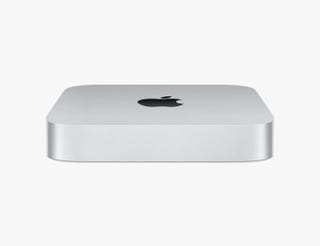
If you’re familiar with the Mac Mini, you know it’s basically a MacBook without a screen, keyboard, or trackpad. It’s a modular machine that needs to be paired with its own external display and peripherals in order for it to work. For someone like me who has worked from home most of the past two years and plans to do so in the near future, this makes his latest M2 Mac Mini a very attractive proposition. It works with the external monitor, wireless keyboard, and wireless mouse you already have, and it’s a lot cheaper than Apple’s newest laptops today. (For context, the M2 Mac Mini is half the price of his M2 MacBook Air.)
The only drawback is the lack of an SD card slot.

One of the best things about the latest MacBook Pro is that Apple has diversified its port selection, especially bringing back many older ports that have been lost in recent years, such as USB-A, HDMI, and SD card slots. That’s it. Year. The latest M2 and M2 Pro Mac Mini also have all these ports, except for the SD card slot.
And that’s one thing I wanted. As someone who takes a fair amount of photos, the lack of an SD card slot is a bit inconvenient. Over the years, I’ve grown accustomed to using dongles with SD card slots to upload photos quickly, so it’s really nice that Apple includes a dongle in their latest Mini machine. , sadly it wasn’t meant to be.
Apple’s M2 and M2 Pro Mac Mini: The Verdict

The latest M2 and M2 Pro Mac Mini are small powerhouses. Apple hasn’t completely rewritten the script over previous Mac Mini designs, but the latest chipsets make these new entries incredibly capable machines.
If you’re not a professional user, the M2 Mac Mini is a really attractive proposition. It performed significantly better than the M1 Mac Mini, and was a night and day difference from the Intel-based Macs of a few years ago. The fact that the M2 Mac Mini is now even cheaper than it used to be makes it feel like an easy deal for most people looking to upgrade their current work-from-home setup.
The Mac Mini with the M2 Pro chip is a little more complicated. Starting at $1,299, it offers a significant performance boost over the M2 Mac Mini, especially in the GPU department. But it’s definitely a more “professional” computer, and for the price it sits in the middle group between the M2 Mac Mini and the higher-end Mac Studio (which has more ports and can be configured with more ports). It is Powerful M1 Max and M1 Ultra chipsets). So the choice is not so easy.

apple
